Bank accounts and templates
Configuration is ready when one correct source account and one valid template produce a preview with every required column in the correct order.
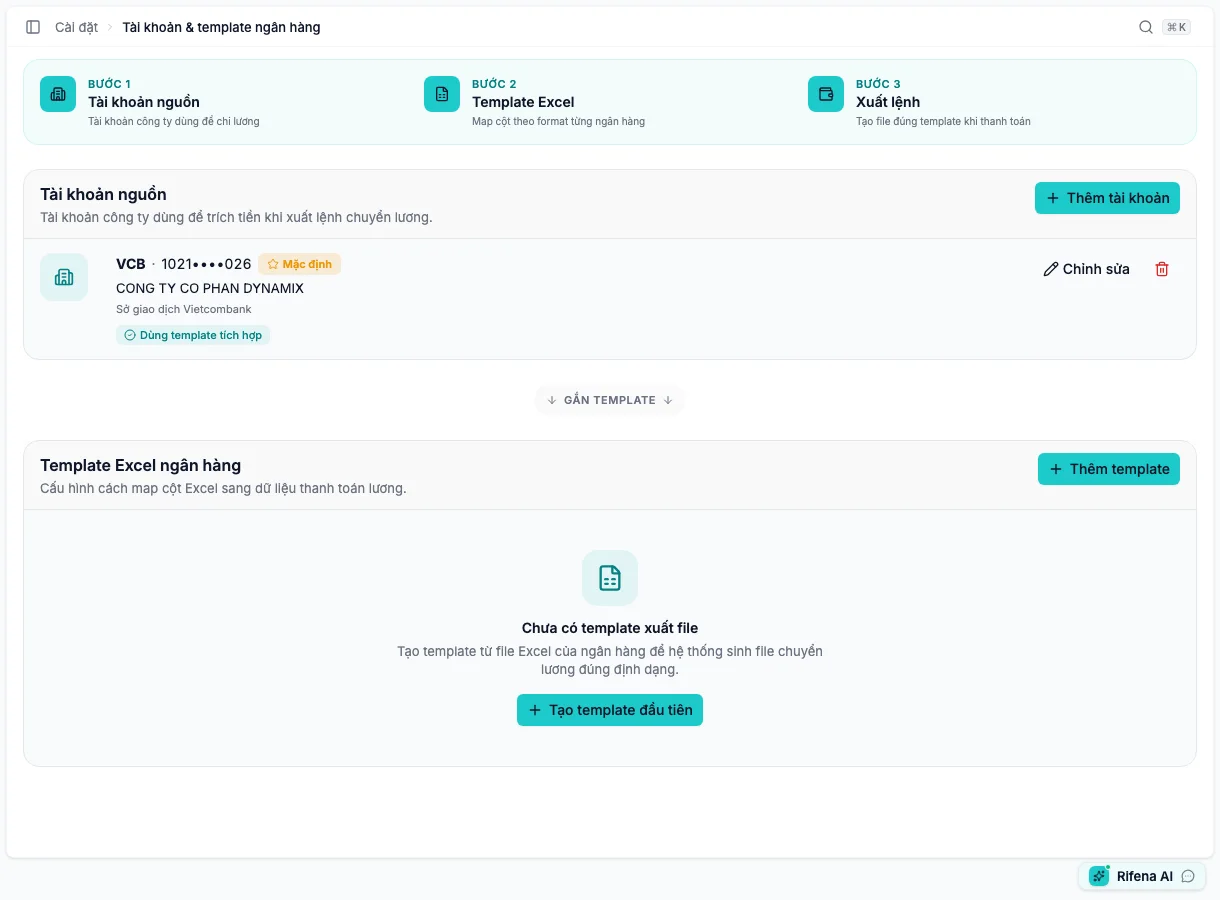
Three configuration layers
Open bank configuration in Rifena →
Source account → Excel template → Export content and order
1. Source account
Create the account used for salary transfers. Verify bank, account number, account holder and any required details.
- Make default
- Preselects the account for a new export; still verify every time.
- Edit
- Update only after bank confirmation; do not replace an account merely to rename it.
- Delete
- Use only while the action is available and the account is not needed for history or export configuration.
The list can still show an Inactive account, but the current account form has no separate deactivate/reactivate action. Do not select that row as a new source; ask an administrator to verify the source state if it must be restored.
Account numbers must be masked in lists. Do not put full numbers in screenshots or ordinary support material.
2. Excel template
Only VCB currently has a built-in format. Every other bank needs an attached
custom format made from the bank’s original .xlsx; Rifena warns while that
configuration is missing.
- Choose Create template.
- Upload the correct original
.xlsx. - Put the export worksheet first in the workbook. The current builder reads the first worksheet and does not offer sheet switching; then select the first data row.
- Map columns to Rifena data. The four required mappings are unaccented recipient name, recipient account, amount and transfer narrative.
- Add employee code, bank, branch or payment reference only when the bank’s format requires it.
- Open Preview and inspect headers, order, formats and sample rows.
- Save and reopen to verify original file and mapping.
3. Preview and export use
Preview uses sample data to validate structure, not the actual payroll recipients. For a real export, verify period, source account, recipients, total and narrative again.
When an action is missing
- Account-only controls: the account can manage sources but not export formats.
- Template-only controls: the inverse permission split.
- No Preview: no template or required mapping is incomplete.
- Cannot replace the source file: edit the template or create the appropriate version rather than changing a completed export.
Readiness checklist
- Correct source account without an Inactive badge
- Account number safely masked
- Correct bank
.xlsx, with the intended worksheet first - All four required fields mapped
- Preview has correct headers, first row and order
- Tested with non-sensitive data before first live export